How-To and Tips Setup
Extra2, Extra3, Extra4 and Extra5 on PS5
Confirmed Checked November 20, 2026
A digital pre-order of GTA VI on PS5 comes with small add-ons named Extra2, Extra3, Extra4 and Extra5. On our console they installed by themselves, but a player's photos show them as Not installed, so check Manage Game Content before launch. Rockstar and Sony have not said what each one is.
On this page
Fact file
| What is known | Label | Source |
|---|---|---|
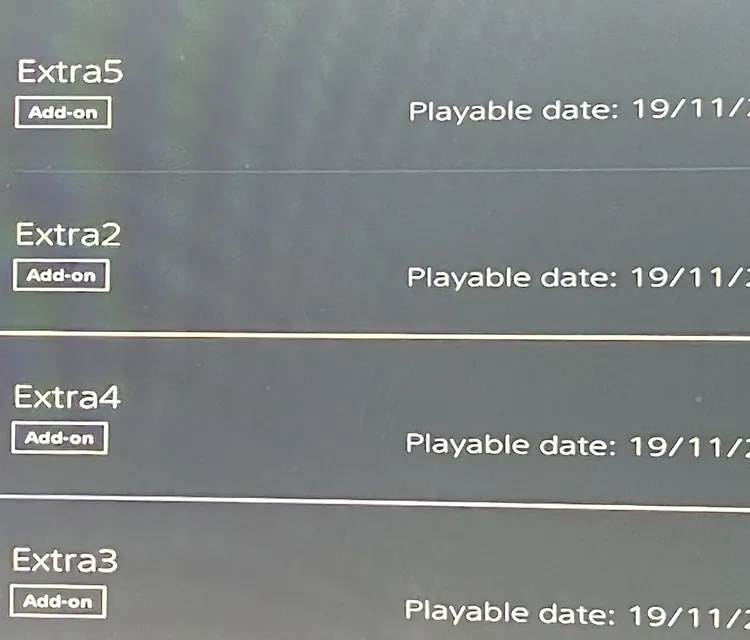
| After we bought the Ultimate Edition from PlayStation Store on November 14, 2026, the PS5 installed four add-ons named Extra2, Extra3, Extra4 and Extra5 alongside the game. | Confirmed | PlayStation Store on our PS5, photographed November 14, 2026 |
| Each one is labeled Add-on and shows a playable date of November 19, 2026, the day the game opens. | Confirmed | PlayStation Store on our PS5, photographed November 14, 2026 |
| Extra2 was listed at 1.38 MB on the purchase screen. | Confirmed | PlayStation Store on our PS5, photographed November 14, 2026 |
| To install an add-on on PS5, go to the Games home screen, highlight the game, press the Options button, select Manage Game Content and select the install icon next to the add-on, Sony says. | Confirmed | PlayStation Support: How to troubleshoot add-on issues |
| A player's photos posted on November 15, 2026 show Extra2, Extra3, Extra4 and Extra5 under Manage Game Content marked Not installed, each with a download arrow. The post calls them hidden extras. On our console the same four installed by themselves. | Rumor | ashynkay on Instagram (player photos) |
| Rockstar lists what a purchase includes: the Ultimate Edition adds in-game vehicles, weapons, shops and garages, every purchase before November 20, 2026 includes the Vintage Vice City Pack, and digital orders add one month of GTA+. | Confirmed | Rockstar Support: Platforms, Editions, and Versions |
| Neither Rockstar nor Sony has said which add-on is which. | Not announced | Rockstar Support: Platforms, Editions, and Versions |
What shows up on the console
Buy Grand Theft Auto VI digitally on a PS5 before launch and the download list fills with more than the game. On ours, after an Ultimate Edition purchase on November 14, 2026, four add-ons were installed: Extra2, Extra3, Extra4 and Extra5. Each is labeled Add-on and carries a playable date of November 19, 2026, the day the game opens. The one whose size we saw, Extra2, was 1.38 MB.
How to check that yours are installed
On our console the four add-ons installed by themselves, and nothing was wrong with the pre-order. That is not the case on every console: a player’s photos posted on November 15, 2026 show the same four names marked Not installed.
Checking takes a minute. On the Games home screen, highlight Grand Theft Auto VI without starting it, press the Options button and select Manage Game Content. Sony’s support page describes the same path. If an add-on says Not installed, select the install icon next to it. At 1.38 MB an add-on is a small file, not a pack of cars or missions, so the download takes seconds.
What is not known yet
Neither Rockstar nor Sony has said which add-on is which. Rockstar’s support pages list what a purchase includes: the Ultimate Edition’s vehicles, weapons, shops and garages, the Vintage Vice City Pack for every purchase before November 20, 2026, and one month of GTA+ with digital orders. The store does not connect those to the four names, and we will not guess. We open the list again when the game is out and write down what each one turns into. Until then, leave them installed.
Open questions
- Which add-on belongs to the Ultimate Edition content, the Vintage Vice City Pack or GTA+.
- Whether a Standard Edition pre-order installs the same four.
- Whether an Extra1 exists.
FAQ
Questions people ask
Q1 What is Extra2 in GTA 6 on PS5?
Extra2 is one of four small add-ons, Extra2 to Extra5, that a PS5 installs with a digital pre-order of Grand Theft Auto VI. On our console it was 1.38 MB and showed a playable date of November 19, 2026. Rockstar and Sony have not said what it contains.
Q2 Do I need to download Extra3, Extra4 and Extra5?
Usually not. On our PS5 they installed by themselves after the purchase. A player's photos show the same four marked Not installed, so check before launch: highlight the game on the home screen, press Options, open Manage Game Content and select the install icon next to any add-on that is not installed. Each one is a small file.
Q3 Does the Standard Edition get the same add-ons?
That is not known yet. Our purchase was the Ultimate Edition, so the list on a Standard Edition console still has to be compared. This page is updated after the game opens on November 19, 2026.
Q4 Where is Manage Game Content on PS5?
On the Games home screen, highlight Grand Theft Auto VI without starting it and press the Options button on the controller. Manage Game Content is in the menu that opens. It lists the add-ons for the game, shows whether each one is installed, and has an install icon next to the ones that are not.